
Holy Trinity CE Primary School
Online & Internet Safety
Online Safety in the Curriculum
We use Purple Mash to deliver our Computing curriculum. This includes units on Online Safety called '2BeSafe'. Each year group follows these strands and the parent guides can be found below:
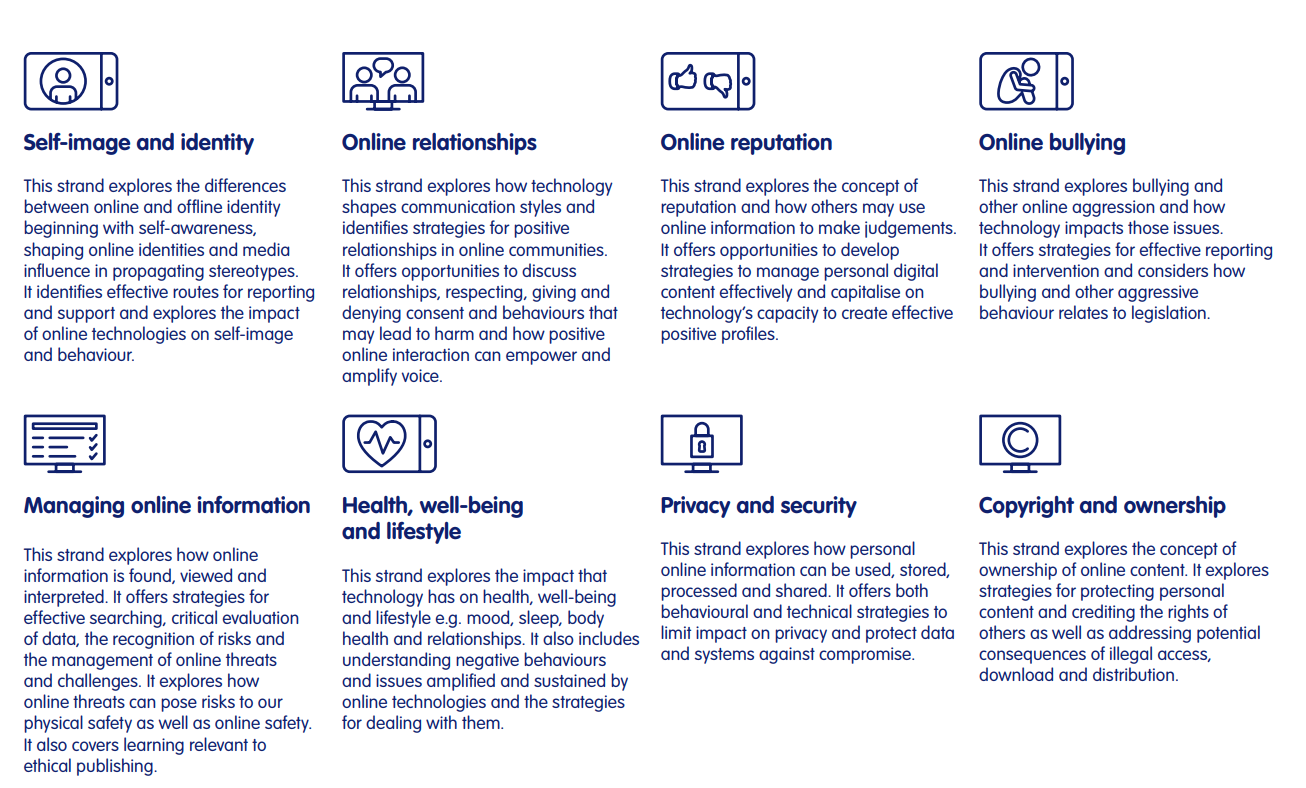
2BeSafe Parent Guides
- 2BeSafe Parent Information – Copyright and OwnershipPDF File
- 2BeSafe Parent Information - Health, Wellbeing and LifestylePDF File
- 2BeSafe Parent Information - Managing Online InformationPDF File
- 2BeSafe Parent Information - Online BullyingPDF File
- 2BeSafe Parent Information - Online RelationshipsPDF File
- 2BeSafe Parent Information – Online ReputationPDF File
- 2BeSafe Parent Information – Privacy and SecurityPDF File
- 2BeSafe Parent Information – Self Image and IdentityPDF File
Internet Safety Policy


Internet Safety Statement
Computing and use of technology in the 21st Century is seen as an essential resource to support learning and teaching, as well as playing an important role in the everyday lives of children, young people and adults. Consequently, schools need to build in the use of these technologies in order to arm our young people with the skills to access life-long learning and employment.
Information and Communications Technology covers a wide range of resources including; web-based and mobile learning. It is also important to recognise the constant and fast paced evolution of ICT within our society as a whole. Currently the internet technologies children and young people are using both inside and outside of the classroom include:
- Websites
- Microsoft 365 - Teams
- Email and Instant Messaging
- Chat Rooms and Social Networking
- Blogs and Wikis
- Podcasting
- Video Broadcasting
- Music Downloading
- Gaming
- Mobile/ Smart phones with text, video and/ or web functionality
- Other mobile devices with web functionality.
There is a significant amount of information on the internet about keeping children safe online. Holy Trinity has its own policy on Internet Safety that can be viewed through our website under key information and in policies.
Home and Family Guidelines
- Talk together, share experiences and have fun learning.
- Involve everyone in discussing & agreeing your family guideline and rules. Remember that sometimes what is acceptable for a 15 year old child is not appropriate for an 8 year old.
- Discuss regularly online safety and go online with your children. Communication is the key to safety.
- Keep anti-virus, spyware and firewall software up to date.
- Ask your internet provider for a service that filters out inappropriate sites (eg: pornography /race hate /extreme violence etc).
- Enable your ‘browser safe’ search and/or consider using internet filtering software, walled gardens and child-friendly search engines.
- Delay buying your child a smart phone until they are older.
- Show how you will look at the browser history and will expect to see sites visited and will want an explanation should the history have been cleared in any way.
- If possible, keep devices in a communal area of the house, where it’s easier to monitor what your children viewing. Never let children have webcams, or similar, in their bedroom.
- Talk to your children about why they should not give out their personal details (eg:, real name, address, mobile number, email, school etc) If they want to subscribe to any online service then make up a family email address to receive the mail.
- Many networking sites do have age restrictions. If you allow your children to use social networking sites (e.g: Facebook), make sure the privacy settings are set either to ‘Friends’ or Customise’ which allows you to restrict posts / photos etc, to be seen only by people you list.
- Insist that your children agree to discuss with you first, if they are asked to meet up with some they’ve met online.
- Monitor & restrict the time your children spend online to help prevent obsessive use of the internet. Encourage activities away from technology!
- Encourage your children, and all family members, to tell you if they feel uncomfortable, upset or threatened by anything they see online.
- Create a set of family guidelines that all the family follow and agree what will happen if they are not followed.
We live in a rapidly ever changing technological world.
Please keep your child safe.
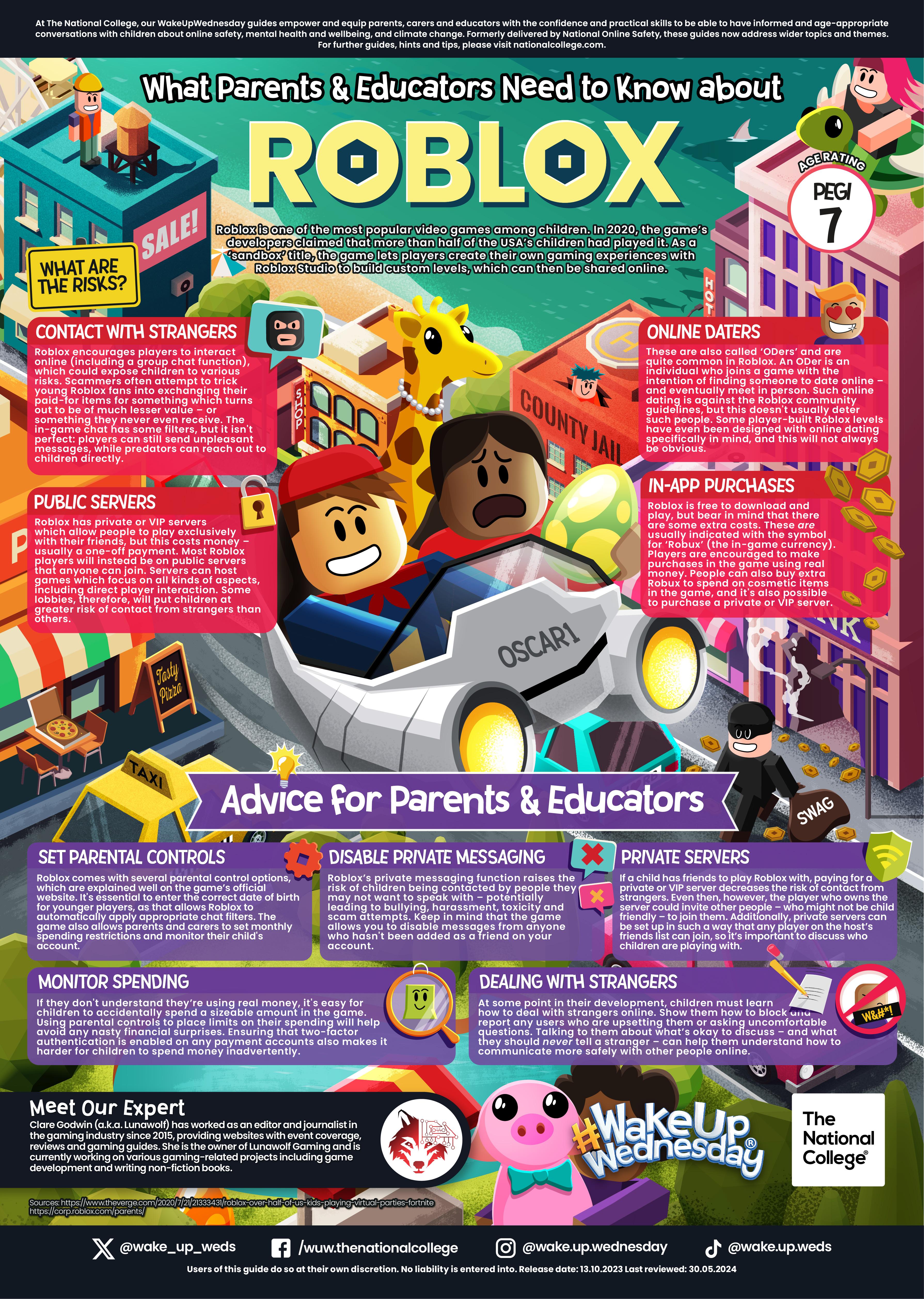
Fortnite
The NSPCC conducted a survey of children who play the online survival game ‘Fortnite’. Shockingly, their research found that 1 in 4 young players have been approached by strangers whilst using the game. The NSPCC are advising parents to turn off the voice chat system in the game to ensure children avoid inappropriate contact. But the charity warned that the main settings menu did not allow players to block text messaging. There are also concerns with the number of prompts for purchasing ‘add-ons’ within the game, with reports of children spending large amounts of money on ‘skins’ and other personalised items, to enhance their chance of winning.
Fortnite is believed to have about 45 million registered players, with up to three million playing it at the same time. It can be accessed online through their website (Mac or PC) or via the Playstation or X-Box. IOS and Android versions have also been released. The game holds a PEGI 12 rating for frequent use of mild violence; however this does not take into consideration the chat feature concerns. It is a cartoonish action game with two key versions: “Fortnite” is a single player survival game and “Fortnite – Battle Royale” is online where 100 players compete against each other until the ‘last one standing’. We have many pupils playing this game from our school and we wanted to bring to your attention some advice. The NSPCC have advised that parents should:
- let children know they could talk to them if upset or worried by anything they had seen online
- familiarise themselves with what their children did online and understand why they liked particular apps or games
- agree family rules on how to use apps, sites and games
- use privacy settings and parental controls to keep children safe
Internet Safety Day
Useful sites
Think you know
Report Abuse
http://www.ceop.gov.uk/reportabuse/index.asp
Childnet International
Safe Social Networking
http://www.safesocialnetworking.com
Microsoft Family Safety Site
http://www.microsoft.com/protect/family
Facebook Safety
http://www.facebook.com/safety
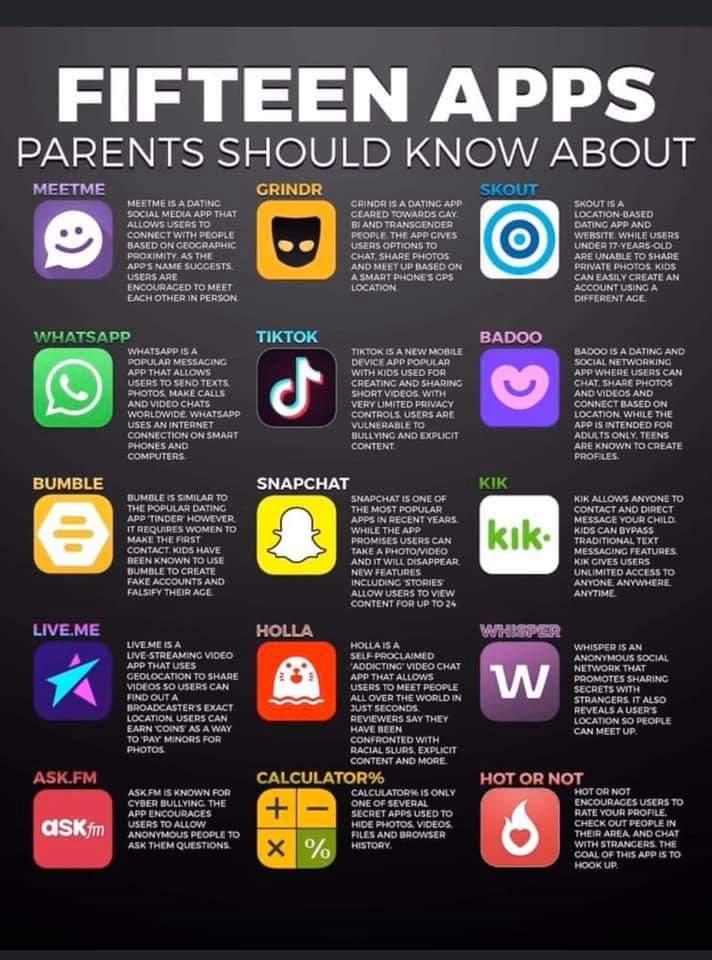
Snapchat Safety
http://bit.ly/2K6T4NL from https://nationalonlinesafety.com
Videos
Here are public links to places where you can look at some of the videos that were shown. Just a word of caution, some are from the CEOP area on Youtube but some are public areas where somebody has posted a copy, therefore comments posted by individuals may not be controlled. Some of them are aimed for older pupils.
Where’s Klaus ?
http://www.youtube.com/watch?v=-IOOn2wR8bU
Private Information
(aimed at age 11–16 )
http://www.youtube.com/watch?v=hK5OeGeudBM
( aimed at age 8 – 10 )
http://www.youtube.com/watch?v=_o8auwnJtqE
Think Before you post
http://www.youtube.com/watch?v=SGlrAhtQC24
… and a follow on.
http://www.youtube.com/watch?v=hOwpGF1SOQM
Cyberbullying (aimed at 11-16 year olds)
http://www.youtube.com/watch?v=dubA2vhIlrg
Grooming (aimed at 11-16 year olds)
One focused on a girl victim
http://www.youtube.com/watch?v=Z5WEnqnq1Hk
and one with a boy victim
http://www.youtube.com/watch?v=nDBDUX7KPT0
CEOP Youtube site
http://www.youtube.com/user/ceop
Who to talk to
For Young People:
Children can talk in confidence on either;
• NSPCC www.there4me.com where they can talk to an NSPCC adviser online
• Childline on 0800 1111 – will not be listed on the telephone bill
For Adults:
Samaritans provide confidential emotional support for people, if you are worried, feel upset or confused and just want to talk. You can:
• Phone on 08457 90 90 90
Email the Samaritans: Jo@samaritans.org